US
US CA
CA
Decode Your VIN & View Vehicle Details
Get useful vehicle details in seconds with VinAudit’s free VIN decoder and VIN lookup tool. Enter a standard 17-character VIN to view available information such as the year, make, model, trim, engine, transmission, drivetrain, fuel economy, dimensions, recalls, market estimates, and more.
Need a deeper look? Upgrade to a full vehicle history report for available title, accident, theft, salvage, ownership, and other history records linked to the VIN.
What is a VIN Decoder?
A VIN decoder is an online tool that reads the information encoded in a standard 17-character Vehicle Identification Number. Depending on the vehicle and available data, it can identify details such as the manufacturer, model year, make, model, trim, engine, body style, transmission, and country or plant of manufacture.
A VIN lookup can help buyers, sellers, vehicle owners, repair shops, insurers, and other automotive professionals confirm a vehicle’s identity and specifications. It is different from a full vehicle history report, which searches for available records associated with that VIN.
Where to Find the VIN
To use a VIN decoder, you first need to locate the VIN on your vehicle. Its exact location can vary depending on the vehicle type and manufacturer, but it’s typically found in a few standard areas.
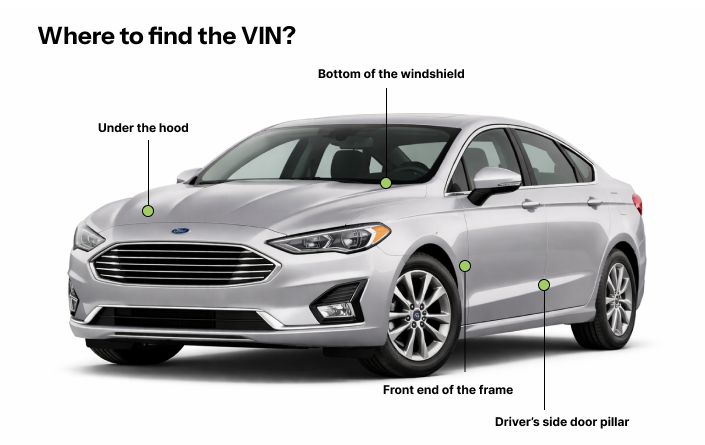
Where to Find the VIN by Vehicle Type
| Vehicle Type | VIN Location |
|---|---|
| Passenger Cars |
|
| Motorcycles |
|
| Recreational Vehicles (RVs) |
|
| ATVs (All-Terrain Vehicles) |
|
The VIN may also appear on the vehicle title, registration certificate, insurance documents, and service or maintenance records.
What You Can Find with a Free VIN Lookup
VinAudit’s free VIN lookup can identify the vehicle and display available specifications, pricing information, recalls, and other summary details. Results vary depending on the VIN and available data.
What the Free VIN Decoder Shows
- ✅ Vehicle identity: Year, make, model, trim, and vehicle style
- ✅ Powertrain: Engine, fuel type, cylinders, transmission, and drivetrain
- ✅ Size and efficiency: Dimensions, seating, fuel capacity, and fuel economy
- ✅ Manufacturing details: Manufacturer and country of manufacture
- ✅ Pricing information: MSRP and available market-value estimates
- ✅ Available summaries: Mileage, price, recall, and sale-listing information
What the Full History Report May Include
For a deeper review, the paid report may include available records related to:
- ✅ Title and title brands: Check for available title records and reported title-brand designations.
- ✅ Accidents or damage: Review available accident and damage records linked to the VIN.
- ✅ Theft: Check for available theft records.
- ✅ Salvage or total loss: Look for available salvage and total-loss information.
- ✅ Odometer history: Review reported mileage records when available.
- ✅ Ownership, liens, and other records: View additional available vehicle-history information.
How to Read a 17-Character VIN
Each section of a standard 17-character Vehicle Identification Number (VIN) identifies information about the vehicle’s manufacturer, attributes, model year, assembly plant, and serial number. Use the diagram and accordion sections below to see how a VIN is organized.

Characters 1–3: World Manufacturer Identifier (WMI)
The first three characters of a VIN form the World Manufacturer Identifier (WMI). This section identifies the vehicle manufacturer and generally indicates the geographic region or country associated with the WMI assignment.
| WMI | Region | Notes |
|---|---|---|
| A-C | Africa | AA-AH = South Africa |
| J-R | Asia | J = Japan |
| KL-KR = South Korea | ||
| L = China | ||
| MA-ME = India | ||
| MF-MK = Indonesia | ||
| ML-MR = Thailand | ||
| MS = Myanmar | ||
| NL-NR = Turkey | ||
| PA-PE = Philippines | ||
| PL-PR = Malaysia | ||
| RF-RG = Taiwan | ||
| S-Z | Europe | SA-SM = United Kingdom |
| SN-ST, W = Germany | ||
| SU-SZ = Poland | ||
| TA-TH = Switzerland | ||
| TJ-TP = Czech Republic | ||
| TR-TV = Hungary | ||
| TW-T1 = Portugal | ||
| VA-VE = Austria | ||
| VF-VR = France | ||
| VS-VW = Spain | ||
| XL-XM = The Netherlands | ||
| X3-X0 = Russia | ||
| YA-YE = Belgium | ||
| YF-YK = Finland | ||
| YS-YW = Sweden | ||
| ZA-ZR = Italy | ||
| 1-5 | North America | 1, 4, 5 = United States |
| 2 = Canada | ||
| 3 = Mexico | ||
| 6-7 | Oceania | 6A-6W = Australia |
| 7A-7E = New Zealand | ||
| 8-9 | South America | 8A-8E = Argentina |
| 8F-8J = Chile | ||
| 8L-8R = Ecuador | ||
| 8X-82 = Venezuela | ||
| 9A-9E, 93-99 = Brazil | ||
| 9F-9J = Colombia |
Characters 4–8: Vehicle Descriptor Section (VDS)
Characters 4 through 8 form the Vehicle Descriptor Section. Depending on the manufacturer, these characters may identify attributes such as the model, body type, engine, restraint system, transmission, or other vehicle specifications.
Character 9: VIN Check Digit
Character 9 is the VIN check digit. It is calculated from the other VIN characters and can help identify certain transcription errors or invalid VIN combinations.
Characters 10–17: Vehicle Identifier Section (VIS)
Characters 10 through 17 form the Vehicle Identifier Section. Character 10 commonly identifies the model year, character 11 may identify the assembly plant, and the remaining characters form the vehicle’s production sequence or serial number. Use the table below to review model-year codes.
| Year | Code | Year | Code | Year | Code | Year | Code |
|---|---|---|---|---|---|---|---|
| 1980 | A | 1995 | S | 2010 | A | 2025 | S |
| 1981 | B | 1996 | T | 2011 | B | 2026 | T |
| 1982 | C | 1997 | V | 2012 | C | 2027 | V |
| 1983 | D | 1998 | W | 2013 | D | 2028 | W |
| 1984 | E | 1999 | X | 2014 | E | 2029 | X |
| 1985 | F | 2000 | Y | 2015 | F | 2030 | Y |
| 1986 | G | 2001 | 1 | 2016 | G | 2031 | 1 |
| 1987 | H | 2002 | 2 | 2017 | H | 2032 | 2 |
| 1988 | J | 2003 | 3 | 2018 | J | 2033 | 3 |
| 1989 | K | 2004 | 4 | 2019 | K | 2034 | 4 |
| 1990 | L | 2005 | 5 | 2020 | L | 2035 | 5 |
| 1991 | M | 2006 | 6 | 2021 | M | 2036 | 6 |
| 1992 | N | 2007 | 7 | 2022 | N | 2037 | 7 |
| 1993 | P | 2008 | 8 | 2023 | P | 2038 | 8 |
| 1994 | R | 2009 | 9 | 2024 | R | 2039 | 9 |
Use Cases for VIN Decoding
VIN decoding supports a wide range of automotive use cases by helping users confirm vehicle identity, specifications, and configuration details. VinAudit’s VIN decoding and automotive data tools are also discussed in this overview of VIN decoder and automotive market data solutions.
- Buying or selling a used vehicle: Verify specifications and model details before committing to a purchase or listing a vehicle for sale.
- Checking specifications before repairs or parts ordering: Ensure you have accurate engine, transmission, and trim information to order compatible parts and accessories.
- Insurance underwriting or risk assessment: Confirm available vehicle specifications and configuration details that may support underwriting, documentation, and risk-assessment workflows.
- Auction evaluations: Confirm vehicle identity, configuration, and available specifications before inspection, valuation, or bidding.
- Fleet management and documentation: Maintain accurate records of fleet vehicle specifications for maintenance planning, resale valuation, and compliance documentation.
If your business needs VIN decoding at scale, explore the VinAudit Vehicle Specifications API or Vehicle History API — fast, reliable solutions for integrating detailed vehicle data directly into your platform.
How VinAudit’s Free VIN Lookup Tool Works
VinAudit’s free VIN decoder makes it easy to unlock a vehicle’s essential details in seconds.
- Enter the standard 17-character VIN number shown on the vehicle or its documents.
- Select Decode VIN to begin the lookup.
- Review the available vehicle specifications and summary information.
- Order a full vehicle history report when detailed records are needed.
VinAudit’s free VIN lookup provides available vehicle specifications and summary information. For detailed title, accident, theft, salvage, ownership, odometer, and other history records, order a full vehicle history report. If you do not have the VIN, you can also search using the license plate lookup.
Frequently Asked Questions (FAQs)
Is the VinAudit VIN decoder free?
Yes. VinAudit’s free VIN decoder lets you enter a standard 17-character VIN and view available vehicle specifications and summary information. You only pay when you choose to order a full vehicle history report.
What information can I get from a free VIN lookup?
Depending on the vehicle and available data, the free VIN lookup may show the year, make, model, trim, engine, transmission, drivetrain, fuel type, dimensions, fuel economy, manufacturer, country of manufacture, market estimates, recall counts, sale-listing counts, and other available vehicle details.
Does the free VIN decoder show accident or title history?
The free decoder focuses mainly on vehicle identification, specifications, and available summary information. Detailed title, accident, theft, salvage, ownership, odometer, lien, and other history records are available through the full vehicle history report when records are found.
What is the difference between a VIN decoder and a vehicle history report?
A VIN decoder reads information encoded in the VIN number and returns available vehicle specifications, such as the make, model, trim, engine, transmission, and body configuration. A vehicle history report searches for available records linked to the VIN, including title, accident, theft, salvage, odometer, ownership, and other history information.
Why is some vehicle information missing from my VIN lookup?
VIN lookup results depend on the vehicle, model year, manufacturer, and the data available for that VIN. Some fields may appear as unavailable when the manufacturer or supporting data source does not provide the information.
Can I decode a VIN that is shorter than 17 characters?
VinAudit’s main decoder is designed for standard 17-character VINs. Older vehicles, some imported vehicles, and certain specialty vehicles may use shorter or nonstandard identification numbers and may not return complete results.
Where can I find the VIN on a vehicle?
For most passenger vehicles, the VIN is visible on the driver’s side of the dashboard near the windshield or on the driver’s door jamb. It may also appear on the vehicle title, registration certificate, insurance documents, and service records. VIN locations can vary for motorcycles, RVs, ATVs, and other vehicle types.
Can I look up a vehicle using its license plate instead?
Yes. When you do not have the VIN, you can use VinAudit’s license plate lookup to search for available vehicle information using the plate number and state.